

Animation
Every numeric property takes keyframes, and every keyframe carries its own interpolation.
Download PremationFree, AGPL-3.0-only, for Windows, macOS and Linux
cubic-bezier(0.25, 0.10, 0.25, 1.00)
Graph editorvalue over time
in 0.25, 0.10out 0.25, 1.00
Preview
Starts gently, ends gently. The default for almost everything.
Position XTransform
Scale, opacity and trackingText animator
PREMATION
The same math as the editor’s graph editor: value and speed tangents on every pair of keyframes.
What you can do
12 capabilities. 1 is marked limited or missing, and say why.
- Graph editor
- Value and speed curves side by side, with real bezier handles that work on linear keys too, and tangent alignment.
- Separated position
- X and Y are independent tracks, so they can ease differently.
- Keyframe assistants
- Easy ease, exponential scale, time-reverse, sequence layers with a real cross-dissolve overlap, stagger, and scaling a keyframe selection in time.
- Bounce
- A decaying bounce generated after the last keyframe, with gravity, elasticity and bounce count. No easing curve can express one, because a bounce is several.
- Motion paths
- Visible and editable on the canvas, with configurable dot spacing.
- Motion sketch
- Record a layer's position by dragging it in real time.
- ExpressionsLimited
- A sandboxed language with coordinate-space helpers and marker access, run by the native engine. Source text can be driven by an expression. Convert to keyframes at any point, or disable one without deleting it. Not general JavaScript.
- Time remapping and stretch
- Retime a nested composition on its own curve. Time Stretch works on any layer, not only footage.
- Motion blur
- Shutter angle and phase, adaptive sampling, two-level gating as in After Effects.
- Smart Animate
- Design two boards, name the elements the same, get the transition between them as ordinary keyframes. Neither board is touched.
- Animate In / Out
- A whole selection arrives one after another — varied entrances, uneven stagger, under a project-wide Motion Feel (Snappy / Smooth / Bouncy).
- Beat-synced timing
- Markers on the beats of the composition's audio, and entrances that land on them.
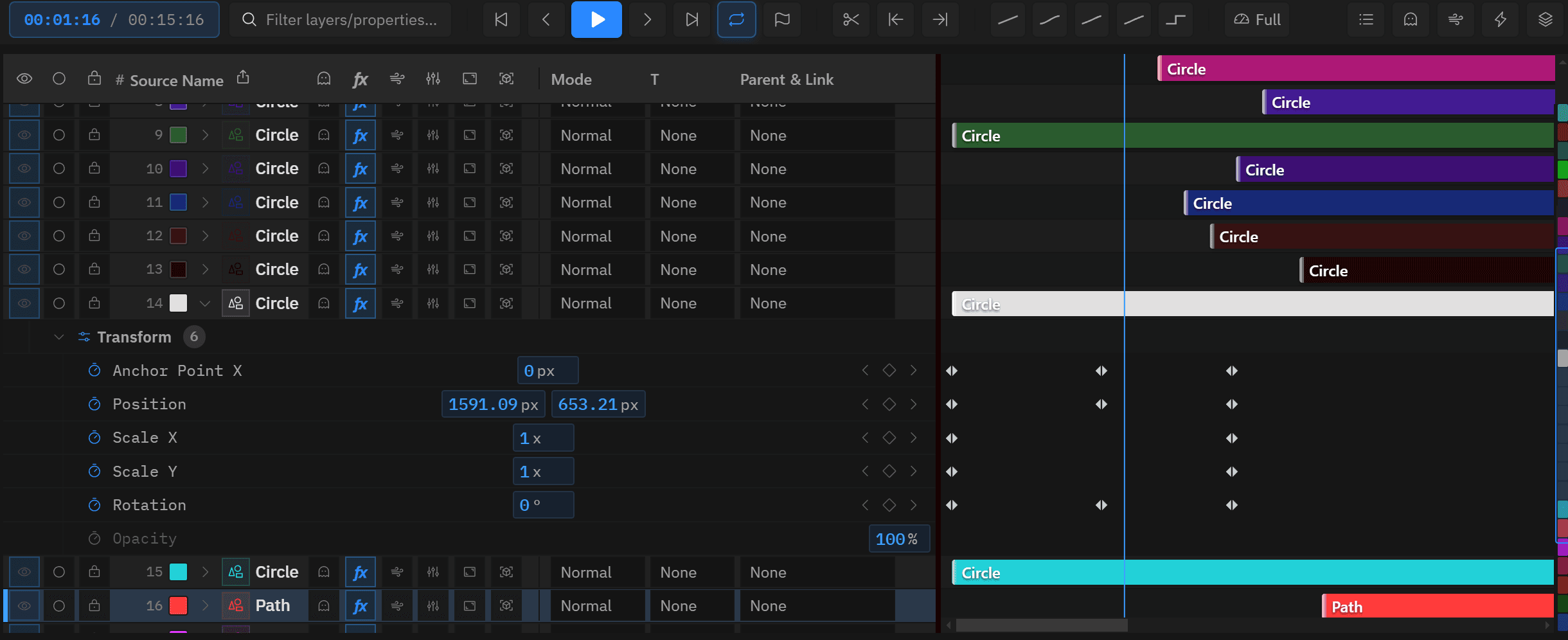
In the editor
The same area in Premation itself, captured from the running app.
Read further
The documentation for this area, in the order it is worth reading.