
Skip to content
COMPARISON

Premation vs After Effects

Feature by feature, with the places After Effects wins stated first. Every number on this page was read out of the source, not out of a brochure.

Download for macOSDownload for Windows

Free · AGPL-3.0 · no account

The short version

Across 25 areas below: Premation is ahead on 9, level on 9, and behind on 7. Those 7 are the ones worth reading first.

Where After Effects wins

  • Effect breadth: 65 against 400-plus once third parties are counted.
  • Motion tracking and rotoscoping, which Premation does not have and is not building.
  • Thirty years of ecosystem: tutorials, templates, plugins, and people who already know it.
  • Maturity. Premation is pre-1.0, and the project file format is still moving.

Where they are level

  • Keyframes, the value-and-speed graph editor, and per-keyframe interpolation.
  • The Classic 3D layer model: cameras, lights, shadows, motion blur.
  • Text animators with the full range and wiggly selector stack.
  • Masks, track mattes, precomps, and 36 of the 38 blend modes.

Where Premation wins

  • A real skeleton rig. After Effects has no bone system at all — its users buy DUIK for this.
  • AI built into the document model, with 61 typed tools, not a text-to-video box bolted on the side.
  • Plugins in a permissioned sandbox, where After Effects runs whatever you downloaded.
  • One render graph for the viewport and the export, so the final file cannot disagree with the preview.
  • Free and AGPL-3.0, against a subscription.

Feature by feature

Animation

Keyframes
AEAny numeric property
PremationAny numeric property
Even
Interpolation is per-keyframe rather than per-property in both.
Graph editor
AEValue and speed curves
PremationValue and speed curves
Even
Bezier handles work on linear keys too, with tangent alignment.
Expressions
AEJavaScript, very large API
PremationOwn language, cycle-safe
After Effects
Smaller surface. It is also sandboxed and CSP-compatible, which the JS engine is not.
Motion blur
AEAngle, phase, adaptive
PremationAngle, phase, adaptive
Even

Compositing

Blend modes
AE38
Premation36
Even
Dissolve and Dancing Dissolve are the two that are missing.
Effects
AE400+ with third parties
Premation65 built in
After Effects
The real gap on this page. The 65 are properly parameterised — Levels, Curves, Channel Mixer, Keylight with despill and choke — but breadth is breadth.
Layer styles
AE9
Premation9
Even
Masks
AEBezier, 7 modes, variable feather
PremationBezier, 7 modes, uniform feather
After Effects
Variable-width feather is the gap. Masks here can scope an individual effect, which AE cannot do.
Track mattes
AEAlpha and luma, invertible
PremationAlpha and luma, invertible
Even
Decoupled from stacking order here, so a matte does not have to sit directly above its target.

3D and rigging

3D model
AEClassic and Advanced (Cinema 4D)
PremationClassic, plus extrusion and bevels
After Effects
Advanced 3D is out of scope by choice: no imported models, no PBR materials, no HDRI.
Cameras, lights, shadows
AEOne- and two-node, DOF
PremationOne- and two-node, DOF
Even
Skeleton rigging
AENone — requires DUIK
PremationFK, IK, FABRIK, weight painting
Premation
Auto-rig presets for biped and quadruped, per-chain IK/FK switching that preserves the pose, and per-vertex numeric weights.
Mesh deform
AEPuppet, two engines
PremationPuppet, ARAP solver
Even
One engine by choice. Bone and puppet rigs compose on the same layer.
Motion tracking, roto
AEYes
PremationNo
After Effects
Not planned. If your work needs tracking, After Effects is the answer and this page will not change that.

Output

Preview and export
AESeparate render paths
PremationOne render graph
Premation
`buildSnapshot` produces one frame description and the same renderer draws it for both. The class of bug where the export looks different does not exist here.
Video formats
AEExtensive via Media Encoder
Premation9, including ProRes 4444
Even
H.264, VP9 with alpha, ProRes 4444, GIF, PNG and JPEG sequences, still frame, Lottie, project file.
Lottie
AEExport via plugin
PremationImport and export, built in
Premation
Determinism
AEWall-clock in places
PremationFrame index divided by fps
Premation
Two exports of one project produce identical frames, and a pixel-comparison harness gates every renderer change.

The product around it

AI
AEFirefly, bolted on
Premation61 tools against the document
Premation
It calls the same operations the UI does, so its output is normal layers and keyframes. One prompt is one undo entry.
Plugins
AECEP/UXP, unsandboxed
PremationWorker sandbox, permissioned
Premation
Permissions are shown before any code exists anywhere, and every mutation a plugin makes is a single undo.
Files
AEProprietary project file
PremationOpen directory bundle
Premation
Content-addressed assets, local version history, incremental saves that touch only what changed.
Offline
AERequires sign-in
PremationZero network calls
Premation
The local edition's API layer refuses to send. There is no account and nothing to sign in to.
Collaboration
AETeam Projects
PremationNone
After Effects
Removed deliberately rather than left unfinished. There is no multiplayer and none is planned.
Ecosystem
AEThirty years of it
PremationStarting
After Effects
Tutorials, templates, a hiring pool, and a plugin market. This is the honest reason to stay on After Effects.
Price
AESubscription
PremationFree, AGPL-3.0
Premation

The two differences that are not a row in a table

Rigging

After Effects has no skeleton

This is not a feature After Effects does less well. It does not have one. Rigging a character there means buying DUIK and driving pins with nulls and expressions, because a pin is the only joint the application offers.

Premation has the rig model itself: bones with forward kinematics, IK chains solved with FABRIK, controllers that link to a bone and reach the solver directly, per-chain IK/FK switching that preserves the pose, and weights you can paint or type per vertex. Auto-rig presets build a biped or a quadruped in one operation.
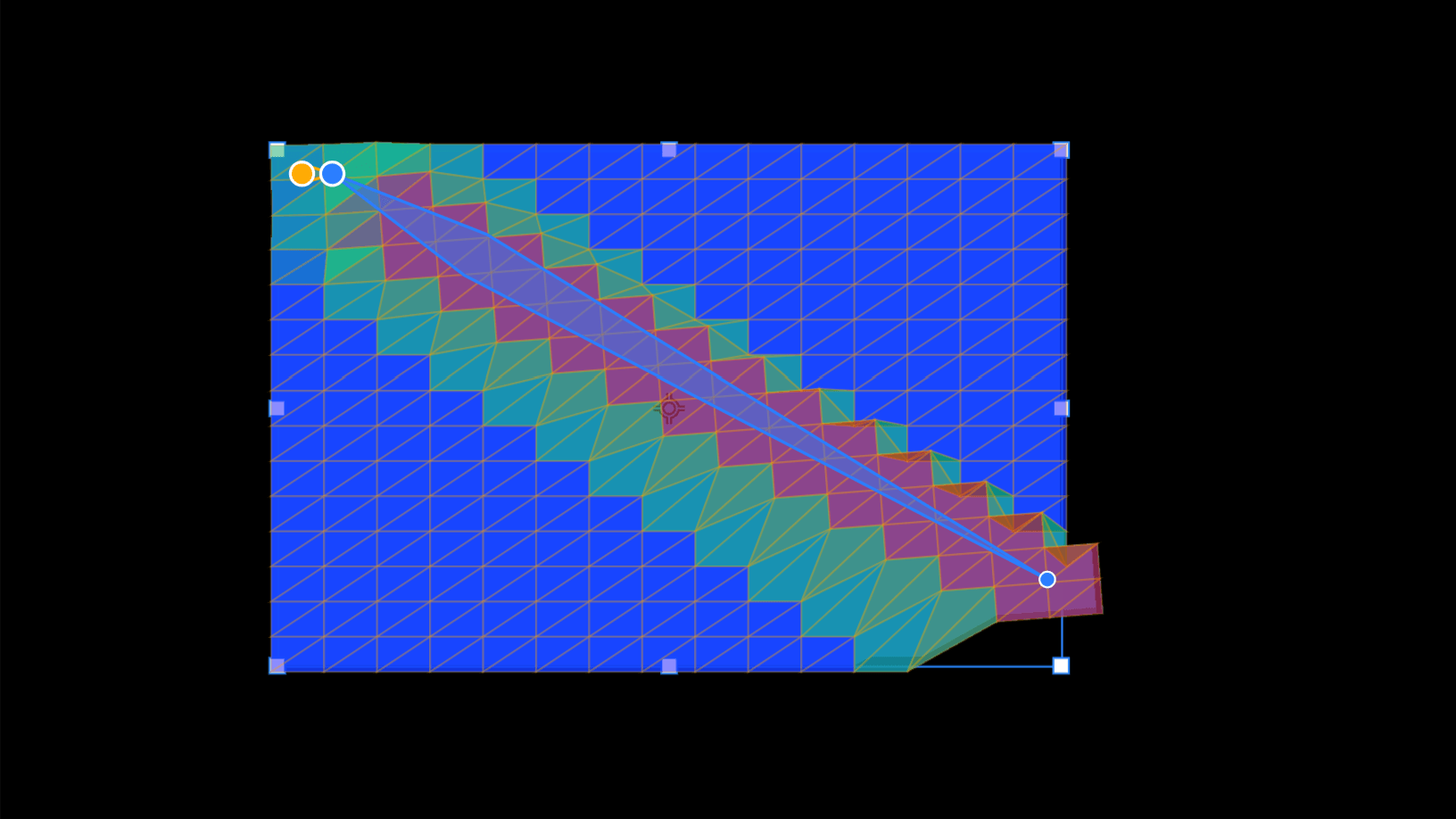
A triangulated mesh with per-vertex weights painted as a heat map and a bone chain running through it
AI

It writes keyframes, not video

The assistant calls the same 61 operations the interface calls. Ask it for a logo reveal and what lands on the timeline is layers, keyframes and easing you can drag, re-time and undo — not a clip you have to accept or throw away.

One prompt is one undo entry. It runs on your own provider key, with no credits and no plan gate, in both editions.

The assistant panel open beside the canvas and the graph editor, with motion presets listed and a prompt composer at the bottom

Should you switch?

For a lot of people the answer is no, and it is cheaper for everyone if that is obvious from this page rather than from a wasted afternoon.

Try it if

  • You animate UI, logos, titles, explainers or social cuts.
  • You want to rig flat characters without buying a second tool.
  • You want the AI to produce keyframes you can edit, not a video you cannot.
  • You want your projects on your own disk, readable without an account.
  • The subscription is the reason you are reading this page.

Stay on After Effects if

  • Your work needs motion tracking or rotoscoping.
  • You depend on specific third-party effect packages.
  • You hand projects to other artists who only know After Effects.
  • You need several people in one project at once.

Nothing here needs an account, and the download is a normal installer from GitHub Releases. Your projects are .motion bundles on your own disk, so trying it costs an evening and leaves nothing behind if you go back.